高级用法
自定义资源选项
默认情况下,ModelResource 会内省模型字段并为每个字段创建带有适当 Widget 的 Field 属性。
字段通过内省声明模型类自动生成。字段定义了我们要导入的资源(例如csv行)与我们想要更新的实例之间的关系。通常,行数据将映射到单个模型实例。在导入过程中,行数据将被设置到模型实例属性(包括实例关系)上。
在简单情况下,行标题的名称将完全映射到模型属性的名称,导入过程将处理此映射。在更复杂的情况下,模型属性和行标题可能不同,我们需要显式声明此映射。有关更多信息,请参阅 显式字段声明。
声明字段
您可以选择性地使用``fields``声明来影响导入/导出过程中处理的字段。
要影响哪些模型字段将包含在资源中,请使用 fields 选项来白名单字段:
class BookResource(resources.ModelResource):

    class Meta:
        model = Book
        fields = ('id', 'name', 'price',)
或者使用``exclude``选项来黑名单字段:
class BookResource(resources.ModelResource):

    class Meta:
        model = Book
        exclude = ('imported', )
如果同时声明了 fields 和 exclude,则 fields 声明优先,exclude 将被忽略。
字段排序
在导入或导出时,会使用由``fields``定义的顺序,但可以使用``import_order``或``export_order``选项为导入或导出的字段设置显式顺序:
class BookResource(resources.ModelResource):

    class Meta:
        model = Book
        fields = ('id', 'name', 'author', 'price',)
        import_order = ('id', 'price',)
        export_order = ('id', 'price', 'author', 'name')
导入/导出字段顺序的优先级定义如下:
import_order或export_order(如果已定义)``fields``(如果已定义)
源自底层模型实例的订单
当 import_order 或 export_order 包含 fields 的子集时,import_order 和 export_order 字段将首先被处理。
如果未定义 fields、import_order 或 export_order,则通过模型类的内省创建字段。模型实例中声明字段的顺序会被保留,任何非模型字段将排在顺序的最后。
模型关系
在定义 ModelResource 字段时可以遵循模型关系:
class BookResource(resources.ModelResource):

    class Meta:
        model = Book
        fields = ('author__name',)
此示例声明 Author.name 值(与 Book 存在外键关系)将出现在导出中。
使用此语法声明关系意味着以下内容:
显式字段声明
我们可以显式声明字段以更好地控制行与模型属性之间的关系。在下面的示例中,我们使用 attribute 参数定义模型属性,并使用 column_name 定义列名(即行标题):
from import_export.fields import Field

class BookResource(resources.ModelResource):
    published_field = Field(attribute='published', column_name='published_date')

    class Meta:
        model = Book
attribute 参数是可选的,如果省略则意味着:
该字段将在导入过程中被忽略。
该字段在导出时会存在,但将具有空值,除非定义了:ref:`dehydrate<advanced_data_manipulation_on_export>`方法。
如果使用 fields 属性来 声明字段,那么声明的资源属性名称必须出现在 fields 列表中:
class BookResource(ModelResource):
    published_field = Field(attribute='published', column_name='published_date')

    class Meta:
        fields = ("published_field",)
        model = Book
字段小部件
小部件是与每个字段声明相关联的对象。小部件有两个作用:
将原始导入数据转换为与实例关联的python对象(参见:meth:.clean)。
将持久化数据导出为合适的导出格式(参见
render())。
有与字符数据、数值、日期、外键相关联的小部件。您也可以定义自己的小部件并将其与字段关联。
A ModelResource 通过内省为给定字段类型创建带有默认小部件的字段。如果小部件需要用不同的参数初始化,可以通过显式声明或通过 widgets 字典来完成。
例如,published 字段被重写以使用不同的日期格式。该格式将同时用于导入和导出资源:
class BookResource(resources.ModelResource):
    published = Field(attribute='published', column_name='published_date',
        widget=DateWidget(format='%d.%m.%Y'))

    class Meta:
        model = Book
或者,可以使用 widgets dict 声明覆盖 widget 参数:
class BookResource(resources.ModelResource):

    class Meta:
        model = Book
        widgets = {
            'published': {'format': '%d.%m.%Y'},
        }
声明字段可能会影响字段的导出顺序。如果这是一个问题,你可以声明 export_order 属性。参见 字段排序。
修改 render() 返回类型
默认情况下,render() 将返回一个字符串类型用于导出。可能存在需要从导出中获取原生类型的用例。如果是这样,您可以使用 coerce_to_string 参数(如果该小部件支持它)。
默认情况下,coerce_to_string 是 True,但如果你将其设为 False,那么在导出时将返回原生类型:
class BookResource(resources.ModelResource):
    published = Field(widget=DateWidget(coerce_to_string=False))

    class Meta:
        model = Book
如果通过Admin界面导出,导出逻辑将检测是导出为XLSX、XLS还是ODS格式,并为*Numeric*、*Boolean*和*Date*值设置原生类型。这意味着``coerce_to_string``值将被忽略,并返回原生类型。因为在大多数用例中,导出格式中预期会使用原生类型。如果需要修改此行为并在“二进制”文件格式中强制使用字符串类型,则唯一的方法是重写widget的``render()``方法。
参见
- 小部件
可用的小部件类型和选项。
基于导入值的自定义工作流
您可以扩展导入流程以基于持久化模型实例的更改添加工作流。
例如,假设您正在导入一个书籍列表,并且您需要在出版日期上执行额外的工作流程。在这个例子中,我们假设存在一个未发布的书籍实例,其“published”字段为空。
将在发布日期执行一次性操作,该操作将通过导入文件中存在'published'字段来识别。
为此,我们需要将取自持久化实例的现有值(即在导入更改之前的值)与更新实例上的传入值进行测试。``instance``和``original``都是:class:`~import_export.results.RowResult`的属性。
你可以覆盖 after_import_row() 方法来检查值是否更改:
class BookResource(resources.ModelResource):

  def after_import_row(self, row, row_result, **kwargs):
      if getattr(row_result.original, "published") is None \
          and getattr(row_result.instance, "published") is not None:
          # import value is different from stored value.
          # exec custom workflow...

  class Meta:
      model = Book
      store_instance = True
备注
如果
skip_diff为 True,original属性将为 null。如果
store_instance为 False,instance属性将为 null。
使用modelresource_factory
modelresource_factory() 函数动态地为你创建 ModelResource 类。这对于无需编写自定义类即可创建资源非常有用。
基本用法
创建一个简单的资源用于导出:
>>> from import_export import resources
>>> from core.models import Book
>>> BookResource = resources.modelresource_factory(
...     model=Book,
...     meta_options={'fields': ('id', 'name', 'author')}
... )
>>>
>>> # Export data
>>> dataset = BookResource().export()
>>> print(dataset.csv)
id,name,author
1,Some book,1
使用自定义配置导入数据:
>>> from import_export import resources
>>> from core.models import Book
>>> # Create a resource for import with specific fields
>>> ImportResource = resources.modelresource_factory(
...     model=Book,
...     meta_options={
...         'fields': ('name', 'author_email'),
...         'import_id_fields': ('name',)
...     }
... )
>>>
>>> # Import data
>>> dataset = tablib.Dataset(['New Book', 'author@example.com'], headers=['name', 'author_email'])
>>> result = ImportResource().import_data(dataset)
>>> print(result.has_errors())
False
添加自定义字段
你可以添加自定义字段和dehydrate方法:
>>> from import_export import resources, fields
>>> from core.models import Book
>>> BookResource = resources.modelresource_factory(
...     model=Book,
...     meta_options={'fields': ('id', 'name', 'custom_title')},
...     custom_fields={
...         'custom_title': fields.Field(column_name='Custom Title', readonly=True)
...     },
...     dehydrate_methods={
...         'custom_title': lambda obj: f"{obj.name} by {obj.author.name if obj.author else 'Unknown'}"
...     }
... )
>>>
>>> dataset = BookResource().export()
>>> print(dataset.csv)
id,name,custom_title
1,Some book,Some book by Author Name
导入期间的验证
导入过程将包括导入期间的基本验证。 如果需要,可以自定义或扩展此验证。
导入过程区分:
解析导入数据失败时出现的验证错误。
处理过程中出现的常规异常。
错误被保留为每个:class:`~import_export.results.RowResult`实例中的:class:`~import_export.results.Error`实例,该实例存储在从导入过程返回的单个:class:`~import_export.results.Result`实例中。
import_data() 方法接受可选参数,这些参数可用于自定义错误处理方式。具体细节请参阅该方法文档。
验证错误
在导入行时,会遍历每个字段,Widgets引发的任何`ValueError <https://docs.python.org/3/library/exceptions.html#ValueError/>`_错误都会被存储在Django的`ValidationError <https://docs.djangoproject.com/en/stable/ref/forms/validation/>`_实例中。
验证错误保留在:attr:`~import_export.results.Result.invalid_rows`列表中,作为:class:`~import_export.results.InvalidRow`实例。
如果以编程方式导入,可以将 import_data() 的 raise_errors 参数设置为 True,这意味着进程将在遇到第一行错误时退出:
rows = [
    (1, 'Lord of the Rings', '1996-01-01'),
    (2, 'The Hobbit', '1996-01-02x'),
]
dataset = tablib.Dataset(*rows, headers=['id', 'name', 'published'])
resource = BookResource()
self.resource.import_data(self.dataset, raise_errors=True)
上述过程将以行号和错误退出(为清晰起见已格式化):
ImportError: 2: {'published': ['Value could not be parsed using defined date formats.']}
  (OrderedDict({'id': 2, 'name': 'The Hobbit', 'published': 'x'}))
要遍历导入产生的所有验证错误,将``False``传递给``raise_errors``:
result = self.resource.import_data(self.dataset, raise_errors=False)
for row in result.invalid_rows:
    print(f"--- row {row.number} ---")
    for field, error in row.error.error_dict.items():
        print(f"{field}: {error} ({row.values})")
如果使用 Admin UI,导入期间会向用户显示错误(见下文)。
通用错误
通用错误会在导入过程中引发,这些情况不属于验证错误。例如,通用错误通常会在保存模型实例时引发,比如尝试将浮点数保存到整数字段。由于通用错误是从调用栈的较低层级引发的,因此并不总能识别出是哪个字段导致了错误。
通用错误保留在:attr:`~import_export.results.Result.error_rows`列表中,作为:class:`~import_export.results.ErrorRow`实例。
raise_errors 参数可在编程式导入期间用于在首个错误处停止导入:
rows = [
    (1, 'Lord of the Rings', '999'),
    (2, 'The Hobbit', 'x'),
]
dataset = tablib.Dataset(*rows, headers=['id', 'name', 'price'])
resource = BookResource()
result = resource.import_data(
    dataset,
    raise_errors=True
)
上述过程将以行号和错误退出(为清晰起见已格式化):
ImportError: 1: [<class 'decimal.ConversionSyntax'>]
  (OrderedDict({'id': 1, 'name': 'Lord of the Rings', 'price': '1x'}))
要遍历导入产生的所有通用错误,将``False``传递给``raise_errors``:
result = self.resource.import_data(self.dataset, raise_errors=False)
for row in result.error_rows:
    print(f"--- row {row.number} ---")
    for field, error in row.error.error_dict.items():
        print(f"{field}: {error} ({error.row})")
备注
full_clean() 仅在Resource选项 clean_model_instances 启用时才会在模型实例上调用。
字段级验证
输入验证可以在导入期间通过widget的:meth:~import_export.widgets.Widget.clean`方法执行,通过抛出`ValueError。更多信息请参考:doc:widget文档 </api_widgets>。
你可以通过重写 clean() 来提供你自己的字段级验证,例如:
class PositiveIntegerWidget(IntegerWidget):
  """Returns a positive integer value"""

  def clean(self, value, row=None, **kwargs):
      val = super().clean(value, row=row, **kwargs)
      if val < 0:
          raise ValueError("value must be positive")
      return val
字段级错误将在 Admin UI 中显示,例如:
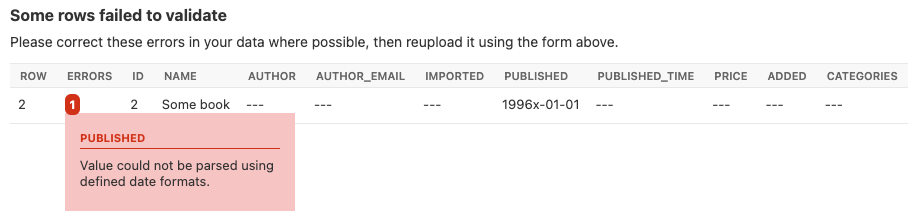
显示字段特定错误的屏幕截图。
实例级验证
你可以选择通过启用`:attr:`~import_export.options.ResourceOptions.clean_model_instances`属性来配置导入-导出,以便在导入期间执行模型实例验证。
你可以重写 full_clean() 方法来提供额外的验证,无论是在字段还是实例级别:
class Book(models.Model):

    def full_clean(self, exclude=None, validate_unique=True):
        super().full_clean(exclude, validate_unique)

        # non field specific validation
        if self.published < date(1900, 1, 1):
            raise ValidationError("book is out of print")

        # field specific validation
        if self.name == "Ulysses":
            raise ValidationError({"name": "book has been banned"})
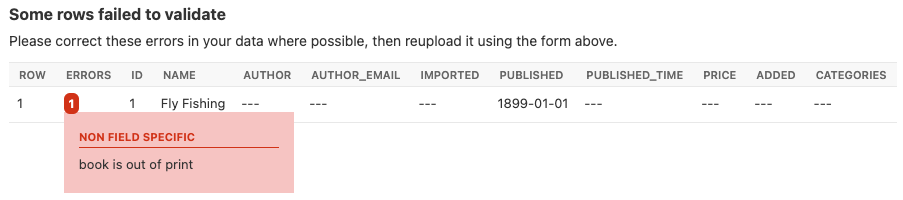
显示非字段特定错误的屏幕截图。
自定义错误处理
你可以自由子类化或替换定义在 results 中的类。重写以下任意或全部钩子以自定义错误处理:
导入模型关系
如果你正在为一个模型实例导入数据,该实例与另一个模型有外键关系,那么import-export可以处理查找并链接到相关模型。
外键关系
ForeignKeyWidget 允许你声明对相关模型的引用。例如,如果我们正在导入一个 'book' csv 文件,那么我们可以有一个通过名称引用作者的字段。
id,title,author
1,The Hobbit, J. R. R. Tolkien
我们将不得不声明我们的 BookResource 使用作者名称作为外键引用:
from import_export import fields
from import_export.widgets import ForeignKeyWidget

class BookResource(resources.ModelResource):
    author = fields.Field(
        column_name='author',
        attribute='author',
        widget=ForeignKeyWidget(Author, field='name'))

    class Meta:
        model = Book
        fields = ('author',)
默认情况下,ForeignKeyWidget 会使用 'pk' 作为查询字段,因此我们必须传递 'name' 作为查询字段。这依赖于 'name' 是相关模型实例的唯一标识符,意味着使用该字段值在相关表上进行查询将返回恰好一个结果。
这是通过 Model.objects.get() 查询实现的,因此如果实例无法根据给定参数唯一标识,则导入过程将引发 DoesNotExist 或 MultipleObjectsReturned 错误。
另请参阅 创建不存在的关联。
请参考 ForeignKeyWidget 文档以获取更详细的信息。
多对多关系
ManyToManyWidget 允许你导入多对多关联引用。例如,我们可以在导入书籍时一并导入关联分类。这些分类指向 Category 表中已存在的数据,并通过分类名称唯一标识。我们在导入文件中使用竖线分隔符,这意味着必须在 ManyToManyWidget 声明中指定此分隔符。
id,title,categories
1,The Hobbit,Fantasy|Classic|Movies
class BookResource(resources.ModelResource):
    categories = fields.Field(
        column_name='categories',
        attribute='categories',
        widget=widgets.ManyToManyWidget(Category, field='name', separator='|')
    )

    class Meta:
        model = Book
创建不存在的关联
上述示例依赖于导入前已存在的关系数据。如果数据尚不存在,则创建数据是一种常见用例。实现这一点的简单方法是重写 ForeignKeyWidget 的 clean() 方法:
class AuthorForeignKeyWidget(ForeignKeyWidget):
    def clean(self, value, row=None, **kwargs):
        try:
            val = super().clean(value)
        except Author.DoesNotExist:
            val = Author.objects.create(name=row['author'])
        return val
现在你需要在 Resource:: 中声明 widget
class BookResource(resources.ModelResource):

    author = fields.Field(
        attribute="author",
        column_name="author",
        widget=AuthorForeignKeyWidget(Author, "name")
    )

    class Meta:
        model = Book
上述代码可以适配处理m2m关系,参见`此线程 <https://github.com/django-import-export/django-import-export/issues/318#issuecomment-861813245>`_。
自定义关系查找
ForeignKeyWidget 和 ManyToManyWidget 小部件将通过在整个关系表中搜索导入的值来查找关系。这是在 get_queryset() 方法中实现的。例如,对于 Author 关系,查找会调用 Author.objects.all()。
在某些情况下,您可能希望自定义此行为,并且可能需要传入动态值。例如,假设我们要查找与特定publisher id关联的作者。我们可以通过将publisher id传递给``Resource``构造函数来实现这一点,然后可以将其传递给widget:
class BookResource(resources.ModelResource):

    def __init__(self, publisher_id):
        super().__init__()
        self.fields["author"] = fields.Field(
            attribute="author",
            column_name="author",
            widget=AuthorForeignKeyWidget(publisher_id),
        )
对应的 ForeignKeyWidget 子类:
class AuthorForeignKeyWidget(ForeignKeyWidget):
    model = Author
    field = 'name'

    def __init__(self, publisher_id, **kwargs):
        super().__init__(self.model, field=self.field, **kwargs)
        self.publisher_id = publisher_id

    def get_queryset(self, value, row, *args, **kwargs):
        return self.model.objects.filter(publisher_id=self.publisher_id)
然后如果导入是从另一个模块调用的,我们会将 publisher_id 传递到 Resource:
>>> resource = BookResource(publisher_id=1)
如果需要在通过Admin UI导入时向Resource传递动态值,请参阅:参见 如何动态设置resource值。
Django自然键
ForeignKeyWidget 还支持使用 Django 的自然键功能。需要通过字段模型的自然键导入外键关系时,需要一个带有 get_by_natural_key 函数的 manager 类,并且该模型必须具有可序列化为 JSON 列表的 natural_key 函数以便导出数据。
自然键功能的主要用途是支持导出数据,这些数据可以导入到具有不同数值主键序列的其他Django环境中。自然键功能支持处理比指定单个字段或PK更复杂的数据。
下面的示例说明了如何在 BookResource 上创建一个字段,使用 Author 模型和 modelmanager 上的自然键功能导入和导出其作者关系。
资源 _meta 选项 use_natural_foreign_keys 为所有支持它的 Models 启用此设置。
from import_export.fields import Field
from import_export.widgets import ForeignKeyWidget

class AuthorManager(models.Manager):

    def get_by_natural_key(self, name):
        return self.get(name=name)

class Author(models.Model):

    objects = AuthorManager()

    name = models.CharField(max_length=100)
    birthday = models.DateTimeField(auto_now_add=True)

    def natural_key(self):
        return (self.name,)

# Only the author field uses natural foreign keys.
class BookResource(resources.ModelResource):

    author = Field(
        column_name = "author",
        attribute = "author",
        widget = ForeignKeyWidget(Author, use_natural_foreign_keys=True)
    )

    class Meta:
        model = Book

# All widgets with foreign key functions use them.
class BookResource(resources.ModelResource):

    class Meta:
        model = Book
        use_natural_foreign_keys = True
阅读更多关于 Django 序列化 的内容。
创建或更新模型实例
使用import-export导入文件时,文件会逐行处理。对于每一行,导入过程将测试该行是否对应于现有存储实例,或者是否要创建新实例。
如果找到现有实例,则该实例将使用导入行的值进行*更新*,否则将创建新行。
为了测试实例是否已存在,import-export需要使用导入行中的某个字段(或字段组合)。其思路是该字段(或多个字段)将唯一标识您正在导入的模型类型的单个实例。
要定义哪些字段标识实例,请使用 import_id_fields 元属性。您可以使用此声明来指示应使用哪个字段(或多个字段)来唯一标识行。如果不声明 import_id_fields,则将使用默认声明,其中仅包含一个字段:'id'。
例如,您可以使用'isbn'号码代替'id'来唯一标识一本书如下:
class BookResource(resources.ModelResource):

    class Meta:
        model = Book
        import_id_fields = ('isbn',)
        fields = ('isbn', 'name', 'author', 'price',)
备注
如果设置 import_id_fields,你必须确保数据能唯一标识单一行。如果所选字段匹配了多行数据,则会引发 MultipleObjectsReturned 异常。如果未识别到任何行,则会引发 DoesNotExist 异常。
使用“动态字段”来识别现有实例
在某些用例中,import_id_fields 中定义的字段并未出现在数据集中。这种情况的一个例子是动态字段,即从其他数据生成并用作标识符的字段。例如:
class BookResource(resources.ModelResource):

    def before_import_row(self, row, **kwargs):
        # generate a value for an existing field, based on another field
        row["hash_id"] = hashlib.sha256(row["name"].encode()).hexdigest()

    class Meta:
        model = Book
        # A 'dynamic field' - i.e. is used to identify existing rows
        # but is not present in the dataset
        import_id_fields = ("hash_id",)
在上述示例中,生成了一个名为*hash_id*的动态字段并添加到数据集中。在此示例中,将会引发错误,因为*hash_id*不存在于数据集中。要解决此问题,请在导入前更新数据集以添加动态字段作为标题:
class BookResource(resources.ModelResource):

    def before_import(self, dataset, **kwargs):
        # mimic a 'dynamic field' - i.e. append field which exists on
        # Book model, but not in dataset
        dataset.headers.append("hash_id")
        super().before_import(dataset, **kwargs)

    def before_import_row(self, row, **kwargs):
        row["hash_id"] = hashlib.sha256(row["name"].encode()).hexdigest()

    class Meta:
        model = Book
        # A 'dynamic field' - i.e. is used to identify existing rows
        # but is not present in the dataset
        import_id_fields = ("hash_id",)
导入后访问实例
访问实例摘要数据
实例 pk 和表示(即 repr() 的输出)可以在导入后访问:
rows = [
    (1, 'Lord of the Rings'),
]
dataset = tablib.Dataset(*rows, headers=['id', 'name'])
resource = BookResource()
result = resource.import_data(dataset)

for row_result in result:
    print("%d: %s" % (row_result.object_id, row_result.object_repr))
访问完整实例数据
所有 'new'、'updated' 和 'deleted' 实例在导入后都可以被访问,如果设置了 store_instance 元属性。
例如,此代码片段展示了如何从结果中检索持久化的行数据:
class BookResourceWithStoreInstance(resources.ModelResource):
    class Meta:
        model = Book
        store_instance = True

rows = [
    (1, 'Lord of the Rings'),
]
dataset = tablib.Dataset(*rows, headers=['id', 'name'])
resource = BookResourceWithStoreInstance()
result = resource.import_data(dataset)

for row_result in result:
    print(row_result.instance.pk)
处理重复数据
如果在导入过程中识别到现有实例,无论导入行的数据是否与持久化数据相同,现有实例都将被更新。您可以通过设置`:attr:`~import_export.options.ResourceOptions.skip_unchanged``来配置导入过程以跳过重复行。
如果 skip_unchanged 被启用,那么导入过程会检查每个定义的导入字段并与现有实例进行简单比较,如果所有比较都相等,则该行会被跳过。跳过的行会被记录在 RowResult 对象中。
你可以重写 skip_row() 方法来完全控制跳过行的实现。
此外,report_skipped 选项控制跳过的记录是否出现在导入的 RowResult 对象中,以及跳过的记录是否会在 Admin UI 的导入预览页面显示:
class BookResource(resources.ModelResource):

    class Meta:
        model = Book
        skip_unchanged = True
        report_skipped = False
        fields = ('id', 'name', 'price',)
参见
如何在持久化之前为所有导入的实例设置值
您可能有一个用例,需要在导入期间为每个创建的实例设置相同的值。例如,您可能需要在导入期间为所有实例设置一个在运行时读取的值。
你可以定义你的资源以关联实例作为参数,然后在每个导入实例上设置它:
class BookResource(ModelResource):

    def __init__(self, publisher_id):
        self.publisher_id = publisher_id

    def before_save_instance(self, instance, row, **kwargs):
        instance.publisher_id = self.publisher_id

    class Meta:
        model = Book
参见 如何动态设置resource值。
导出时的数据操作
并非所有数据都能轻易从对象/模型属性中提取。为了在导出时将复杂的数据模型转换为(通常更简单的)处理后数据结构,应定义``dehydrate_<fieldname>``方法:
from import_export.fields import Field

class BookResource(resources.ModelResource):
    full_title = Field()

    class Meta:
        model = Book

    def dehydrate_full_title(self, book):
        book_name = getattr(book, "name", "unknown")
        author_name = getattr(book.author, "name", "unknown")
        return '%s by %s' % (book_name, author_name)
在这种情况下,导出看起来像这样:
>>> from app.admin import BookResource
>>> dataset = BookResource().export()
>>> print(dataset.csv)
full_title,id,name,author,author_email,imported,published,price,categories
Some book by 1,2,Some book,1,,0,2012-12-05,8.85,1
也可以传递一个方法名或可调用对象给 Field() 构造函数。如果提供了这个方法名或可调用对象,那么它将被作为 'dehydrate' 方法调用。例如:
from import_export.fields import Field

# Using method name
class BookResource(resources.ModelResource):
    full_title = Field(dehydrate_method='custom_dehydrate_method')

    class Meta:
        model = Book

    def custom_dehydrate_method(self, book):
        return f"{book.name} by {book.author.name}"

# Using a callable directly
def custom_dehydrate_callable(book):
    return f"{book.name} by {book.author.name}"

class BookResource(resources.ModelResource):
    full_title = Field(dehydrate_method=custom_dehydrate_callable)

    class Meta:
        model = Book
在导出期间过滤查询集
你可以使用 filter_export() 在导出时过滤查询集。另请参阅 自定义管理员导出表单。
导出后修改数据集
after_export() 方法允许您在 tablib 数据集被渲染为导出格式之前对其进行修改。
这对于添加动态列或向最终数据集应用自定义逻辑很有用。
使用不同字段进行导入和导出
如果你想导入一组字段,然后导出一组不同的字段,那么推荐的方法是定义两个资源:
class BookImportResource(ModelResource):
    class Meta:
        model = Book
        fields = ["id", "name"]


class BookExportResource(ModelResource):
    class Meta:
        model = Book
        fields = ["id", "name", "published"]
如果您在 Admin UI 中使用这些资源,请在您的 admin class 中声明它们。
修改xlsx格式
可以修改任何XLSX导出的输出。输出字节可以通过`openpyxl <https://openpyxl.readthedocs.io/en/stable/>`_库(可作为import_export依赖项包含)读取并修改。
你可以像这样重写 get_export_data() 方法:
def get_export_data(self, file_format, request, queryset, **kwargs):
    blob = super().get_export_data(file_format, request, queryset, **kwargs)
    workbook_data = BytesIO(blob)
    workbook_data.seek(0)
    wb = openpyxl.load_workbook(workbook_data)
    # modify workbook as required
    output = BytesIO()
    wb.save(output)
    return output.getvalue()
自定义导出文件名
通过重写 get_export_filename() 来自定义导出文件名。
信号
要挂钩导入-导出工作流,可以连接到 post_import, post_export 信号:
from django.dispatch import receiver
from import_export.signals import post_import, post_export

@receiver(post_import, dispatch_uid='balabala...')
def _post_import(model, **kwargs):
    # model is the actual model instance which after import
    pass

@receiver(post_export, dispatch_uid='balabala...')
def _post_export(model, **kwargs):
    # model is the actual model instance which after export
    pass
并发写入
如果您的应用程序允许在导入期间对数据进行并发写入,则需要特别考虑。
例如,考虑以下场景:
运行导入流程以导入通过标题识别的新书籍。
调用了
get_or_init_instance()并识别出不存在具有此标题的现有书籍,因此导入过程将创建它作为新记录。就在那一刻,另一个进程插入了同名的书。
当行导入过程完成时,
save()被调用并抛出错误,因为书籍已存在于数据库中。
默认情况下,import-export不会阻止这种情况发生,因此您需要考虑在导入过程中哪些进程可能会修改共享表,以及如何降低风险。如果您的数据库强制执行完整性,则可能会引发错误;如果没有,则可能会出现重复数据。
潜在解决方案包括:
使用其中一种 导入工作流 方法在导入期间锁定表(如果数据库支持此操作)。
这应该仅在特殊情况下进行,因为会对性能产生影响。
你需要在正常工作流程中释放锁,如果有错误也需要释放锁。
重写
do_instance_save()以执行 update_or_create()。这可以确保在并发访问时保持数据完整性。修改工作方式以避免并发写入的风险。例如,可以安排仅在夜间运行导入。
如果使用 bulk imports,这个问题可能更普遍。这是因为实例在批量写入前会在内存中保存更长时间,因此存在另一个进程在实例持久化之前修改它的更大风险。
额外配置
请参考 API文档 获取更多配置选项。